We checked 230 Mississauga contractor websites on a phone. Here is what they miss.
We loaded 230 Mississauga contractor homepages on a phone. A quarter had no phone number on the first screen. The numbers, and five fixes.
Most people find a contractor on their phone. They search, tap a result, and decide in a few seconds whether to call. So we wanted to know what a contractor's website actually shows in those first few seconds.
In September we loaded the homepages of 230 Mississauga contracting businesses at the size of a phone screen and recorded what was there. On 19 October we went back and read the structured data (the code that describes the business to search engines) on the 225 sites that still loaded.
The short version: the basics are mostly solved. Almost every site is secure and most are built for phones. The gaps are in the things that turn a visit into a call.
How we did it
We found 251 contracting businesses in Mississauga through OpenStreetMap and ordinary web searches: general contractors, renovators, roofers, plumbers, electricians, HVAC, flooring and a few others. 230 had a homepage that loaded.
Each homepage was opened in a headless browser twice: once as an iPhone at 390 by 844 pixels, once as a desktop at 1440 by 900. "The first phone screen" below means what fits in that 390 by 844 window before you scroll.
This is not a random sample of every contractor in the city. It is the businesses that show up on a map and in search, which is the group a homeowner sees anyway. We are not naming any of them.
What the first phone screen is missing
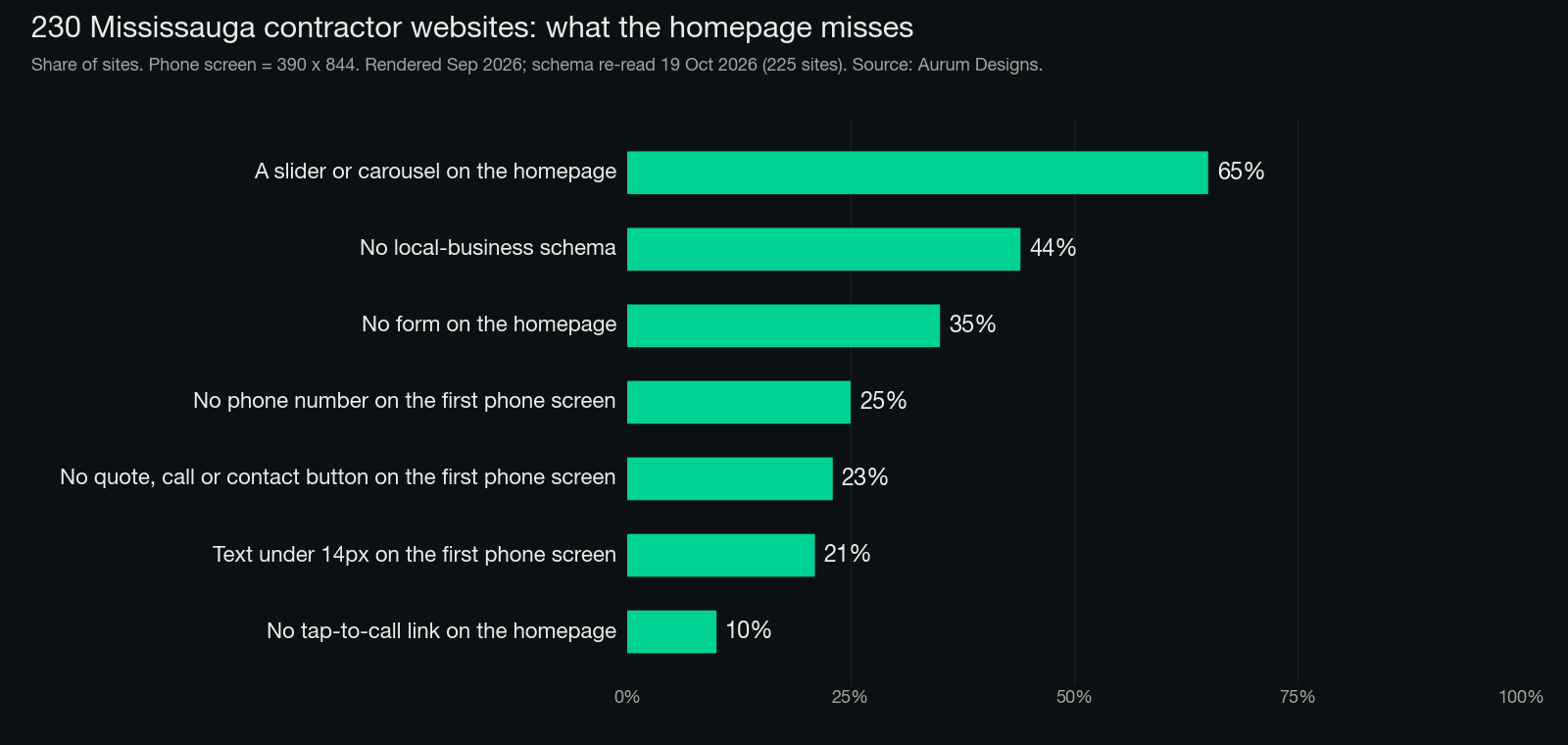
A phone number. On 25% of sites we could not find a phone number on the first phone screen: no visible tap-to-call link, and no number in the header or the opening lines of the page. 10% had no tap-to-call link anywhere on the homepage, so a visitor has to copy the number by hand.
A next step. 23% had no button or link on the first phone screen that said anything like quote, estimate, contact, call or book. The visitor has to scroll and guess.
Readable text. 21% showed paragraph or list text smaller than 14 pixels on the first phone screen. That is small enough that many people zoom or give up.
What the rest of the homepage is missing
A form. 35% had no form anywhere on the homepage. Some people would rather type than call, especially during the workday.
A slider. 65% had a slider or carousel somewhere on the homepage. On a phone, a rotating banner usually means the first screen shows one slide of several, with the headline changing before anyone reads it.
A machine-readable description of the business. 44% had no local-business structured data at all, the code that tells Google "this is a contractor, here is the name, address and phone". Only 48% had a business block with both an address and a phone number. 11% had no structured data of any kind. More common than a local-business type was the generic Organization type (115 sites against 75 for LocalBusiness), which is what many WordPress plugins write by default.
What most sites get right
It is not all bad news, and the good news matters.
- 99% load over HTTPS. Only 3 of 230 did not.
- 91% are set up for phones (they have a mobile viewport). The other 9% show a shrunken desktop page on a phone.
- 96% fit the phone screen without scrolling sideways.
So the problem is rarely that a site is broken. It is that the site was built to look good on a desktop in a meeting, not to get a call from someone standing in their kitchen.
The five fixes we would make first
If you run a contracting business, open your own homepage on your phone and check these. It takes two minutes.
- Your phone number is on the first screen, and tapping it starts a call. Put it in the header so it stays put.
- One clear button on the first screen. "Get a quote" or "Call now". One, not three.
- No slider. One strong photo of real work and one sentence saying what you do and where.
- A short form on the homepage. Name, phone, what you need. Three fields is enough to start.
- Local-business structured data with your name, address or service area, and phone. If you are on WordPress, your SEO plugin can usually do this in its settings.
None of this needs a new website. Most of it is an afternoon of changes on the one you have.
Why we did this
We build websites for contractors and other local businesses, so we look at a lot of contractor sites. We wanted numbers instead of impressions. If you want to see how we build the first screen, the websites page shows what goes into each one, and what an AI reads before it recommends you covers the structured data side in more depth. To check your own site for the same gaps, run the free AI visibility check.
Method notes: homepages rendered 20 September 2026 with a headless Chrome browser (iPhone and desktop user agents). Structured data re-read 19 October 2026 from the raw HTML of 225 homepages, including JSON-LD written as a graph. A "button" counts if its text contains quote, estimate, contact, call, book, schedule, get started or free. Figures are rounded to the nearest whole percent.
FAQ
Where should the phone number go on a contractor website?
On the first phone screen, in the header so it stays put, and as a tap-to-call link so tapping it starts a call. When we checked 230 Mississauga contractor homepages on a phone, 25% had no phone number on the first screen, and 10% had no tap-to-call link anywhere on the homepage.
What should a contractor homepage show on a phone before you scroll?
A phone number that starts a call when tapped, one clear button such as "Get a quote" or "Call now", and text big enough to read. On the first phone screen, 23% of the sites we checked had no quote, estimate, contact, call or book link, and 21% showed paragraph or list text smaller than 14 pixels.
Are sliders bad for a contractor website on a phone?
On a phone, a rotating banner usually means the first screen shows only one of several slides, and the headline changes before anyone reads it. 65% of the 230 homepages we checked had a slider or carousel. We would replace it with one strong photo of real work and one sentence saying what you do and where.
Does a contractor website need a contact form if it shows a phone number?
We would add one. Some people would rather type than call, especially during the workday, and 35% of the homepages we checked had no form anywhere. A short form asking for name, phone and what you need is enough to start.
How do I add local business structured data to my contractor website?
If you are on WordPress, your SEO plugin can usually do it in its settings. Include your business name, your address or service area, and your phone number. 44% of the sites we checked had no local-business structured data at all, and many WordPress plugins write the generic Organization type by default.